3.4.4 Devices and Channels
Devices is admin-only. It registers meters the loader is allowed to poll and the Modbus map for each register you care about.
Open Devices in the top nav (admins). Non-admins never see the link.
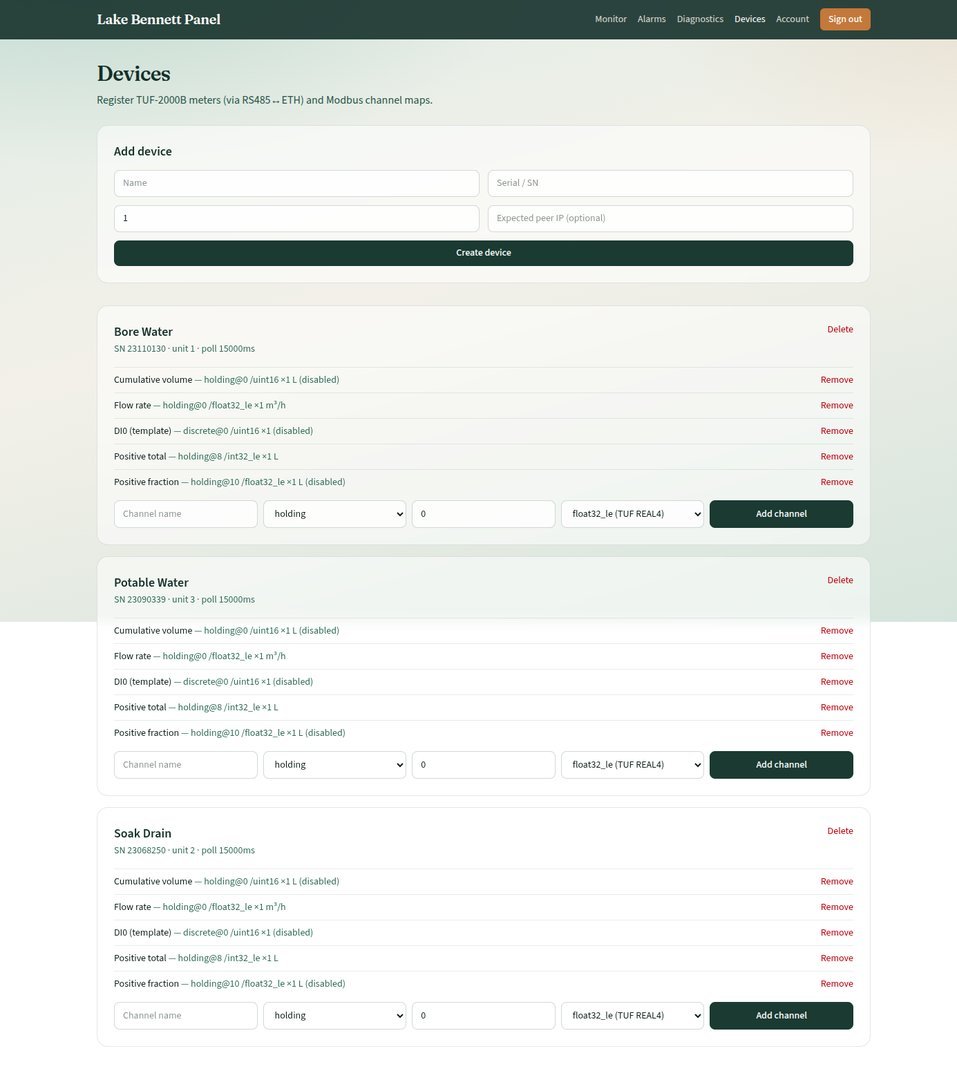
What a Device Is
One physical TUF-2000B (or similar) behind an RS485-to-Ethernet gateway.
| Field | Meaning |
|---|---|
| Name | Shown in Monitor and Diagnostics (for example Bore Water) |
| SN | Unique serial / identity |
| Modbus unit ID | Slave ID on the RS485 bus. Must match meter menu M46. Range 1–247 |
| Expected peer IP | Optional. If set, the loader prefers a TCP client from that gateway LAN IP. If empty, it matches on Modbus unit ID alone |
| Poll interval | Milliseconds between poll cycles while the TCP session is up. Default 15000 |
| Enabled | Disabled devices are not resolved by the loader |
Estate Meters
| Name | SN | Unit ID |
|---|---|---|
| Bore Water | 23110130 | 1 |
| Soak Drain | 23068250 | 2 |
| Potable Water | 23090339 | 3 |
Add a Device
- Add device form at the top of the page
- Name, SN, Modbus unit ID, optional expected peer IP
- Create device
Then add channels on that card. A device with no enabled channels will connect but the session goes to error: “No enabled channels for this device”.
Delete on the card removes the device and cascades readings, channels, and alarms.
What a Channel Is
One Modbus read, scaled and stored as a time series.
| Field | Meaning |
|---|---|
| Name | Shown in Monitor (for example Positive total) |
| Register type | holding (FC03), input (FC04), coil (FC01), discrete (FC02). TUF totals use holding |
| Address | 0-based Modbus address. TUF manuals number REG0001 as address 0 (REG − 1) |
| Count | Number of 16-bit registers. TUF REAL4/LONG values use 2 |
| Data format | How those registers become a number (below) |
| Scale / offset | stored = raw × scale + offset. Seeded channels use scale 1, offset 0 |
| Unit | Label only (L, m³/h) |
| Enabled | Disabled channels are hidden on Monitor and not polled |
| Sort order | Display and poll order |
Data Formats
| Format | Use |
|---|---|
float32_le |
TUF REAL4 (for example flow rate REG0001–0002, address 0) |
int32_le |
TUF LONG (positive total REG0009–0010, address 8), litres if M31 is L |
uint32_be |
32-bit unsigned, big-endian |
uint16 |
Single register |
Seeded TUF Map
Keep these unless you know the meter manual:
| Channel | Type | Address | Count | Format | Unit | Enabled |
|---|---|---|---|---|---|---|
| Flow rate | holding | 0 | 2 | float32_le | m³/h | yes |
| Positive total | holding | 8 | 2 | int32_le | L | yes |
| Positive fraction | holding | 10 | 2 | float32_le | L | no (optional) |
Add a Channel (Admin UI)
On the device card: name, register type, address, data format, Add channel. The UI currently sends count 2 and unit m³/h by default for new channels — adjust via authorised technical staff if you add a 16-bit coil or a litre total.
Remove deletes that channel and its readings.
How the Loader Picks a Device
On TCP connect from a peer, the loader matches:
- Expected peer IP: Enabled devices where expected peer IP equals that IP, or
- Modbus unit ID: Enabled devices with no expected IP and matching Modbus unit ID
Unknown peers can be rejected by server configuration. Hardware wiring and meter menus: 3.4.6 Field Hardware.
Version Control
| Version | Date | Description |
|---|---|---|
| 1.0 | 2026-10-18 | Initial Release |
| 1.1 | 2026-10-20 | Style guide compliance — loader match list (not numbered alternatives) |
Next Review Date: 2027-04-20